How to Download Douyin HD Videos Without Watermark: GrabClip Tutorial
Many people run into the same problems when trying to save Douyin videos:
- They are not sure which Douyin video link to copy
- Some tools have too many steps and require installing an app
- They want to download directly on mobile or desktop, but the process feels inconvenient
- They are not sure whether the tool supports common formats like douyin.com, v.douyin.com, or shared links
If you want a simpler way to save Douyin videos, using a browser-based online tool is usually the most direct option.
GrabClip’s Douyin video downloader page supports common Douyin video link formats, with no software installation and no account registration required.
Tool page:
https://www.grabclip.com/douyin
What People Care About Most When Downloading Douyin Videos
When users search for terms like “Douyin video download,” “download Douyin videos without watermark,” or “Douyin HD video download,” they usually care less about the tool name and more about questions like these:
- Does it support Douyin video links?
- Does it work with
douyin.com,v.douyin.com, and common shared links? - Can the whole process be completed directly in a browser?
- Do I need to sign in to a Douyin account?
- Does it work on Windows / Mac / iPhone / Android?
- Is the video quality clear, and can I save HD, 1080P, or even 4K versions?
- Besides video, can audio also be downloaded?
That is why a useful tutorial should not only tell users where to go, but also explain the full process clearly.
What GrabClip Is Useful For
If your goal is to save Douyin videos, a browser-based tool like GrabClip is useful for situations like these:
- You want to download Douyin videos
- You want to save a version without watermark
- You want to process Douyin video links directly in your browser
- You do not want to install extra software or apps
- You want to finish the process quickly on desktop or mobile
- You want to save video materials for later reference, backup, or content organization
- You want a clearer version when HD / 1080P / 4K is available
- You want to save Douyin audio separately
For users who just want to save content quickly, a browser workflow is often more direct than installing software:
copy the link, open the page, paste it, and save the file.
Key Features of GrabClip
These are also some of the things many users pay attention to when choosing a Douyin video downloader.
1. Works directly in your browser
There is no need to install software or an app.
Whether you are using a computer, tablet, or phone, you can start as long as you can open the page in a browser.
2. Supports common Douyin video links
According to the current tool page, GrabClip supports common Douyin link formats, including:
www.douyin.com/video/...v.douyin.com/...www.iesdouyin.com/share/video/...- Douyin page links with
modal_id=
If these are the kinds of Douyin video links you usually save, the workflow is straightforward.
3. No login or registration required
GrabClip does not require account registration, and you do not need to sign in to Douyin before processing video links.
4. Supports higher-quality downloads
The tool page indicates support for original quality, HD, 1080P, and even 4K when available. This is useful for users who want clearer video files for reference or editing.
5. Supports both video and audio downloads
According to the current tool page, GrabClip supports downloading Douyin audio as well as video.
This is helpful if you want to edit, archive, or extract sound separately.
6. Better for everyday saving and content organization
Many users do not just want to watch a video once. They want to save it for inspiration, editing reference, social media research, or daily archiving.
A browser-based tool is often more convenient for these use cases.
How to Download Douyin Videos Without Watermark
Here is the typical workflow.
Step 1: Open Douyin and find the video you want to save
You can find the content in the Douyin app, or open Douyin in your browser.
If the video page is already open, go to that content page first before copying the link.

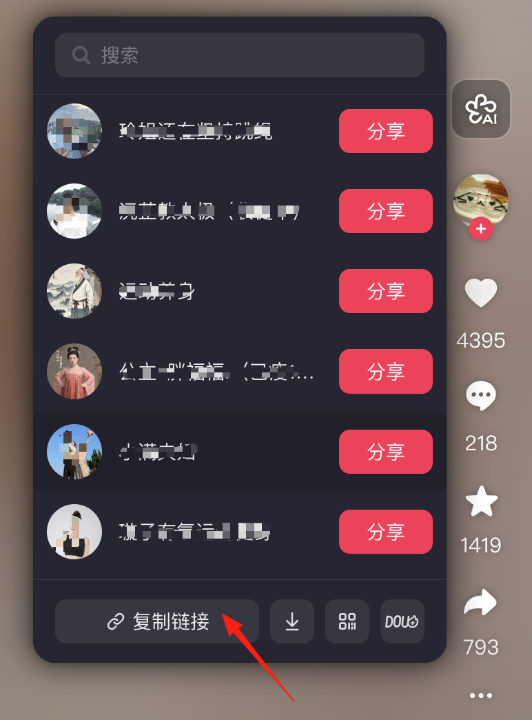
Step 2: Copy the Douyin video link
After finding the video you want to download on Douyin:
- Tap Share
- Choose Copy link
- Save the link to your clipboard
GrabClip currently supports common link formats such as:
https://www.iesdouyin.com/share/video/xxxxxxxxxhttps://www.douyin.com/video/xxxxxxxxxhttps://v.douyin.com/xxxxxx/https://www.douyin.com/jingxuan?modal_id=xxxxxxxxx
If you copy the full shared video link or video page link, the next step is usually more straightforward.
Step 3: Open the GrabClip Douyin page
Go to the following page in your browser:
https://www.grabclip.com/douyin
This is the entry page for processing Douyin video links.
It is a good idea to bookmark it for future use.
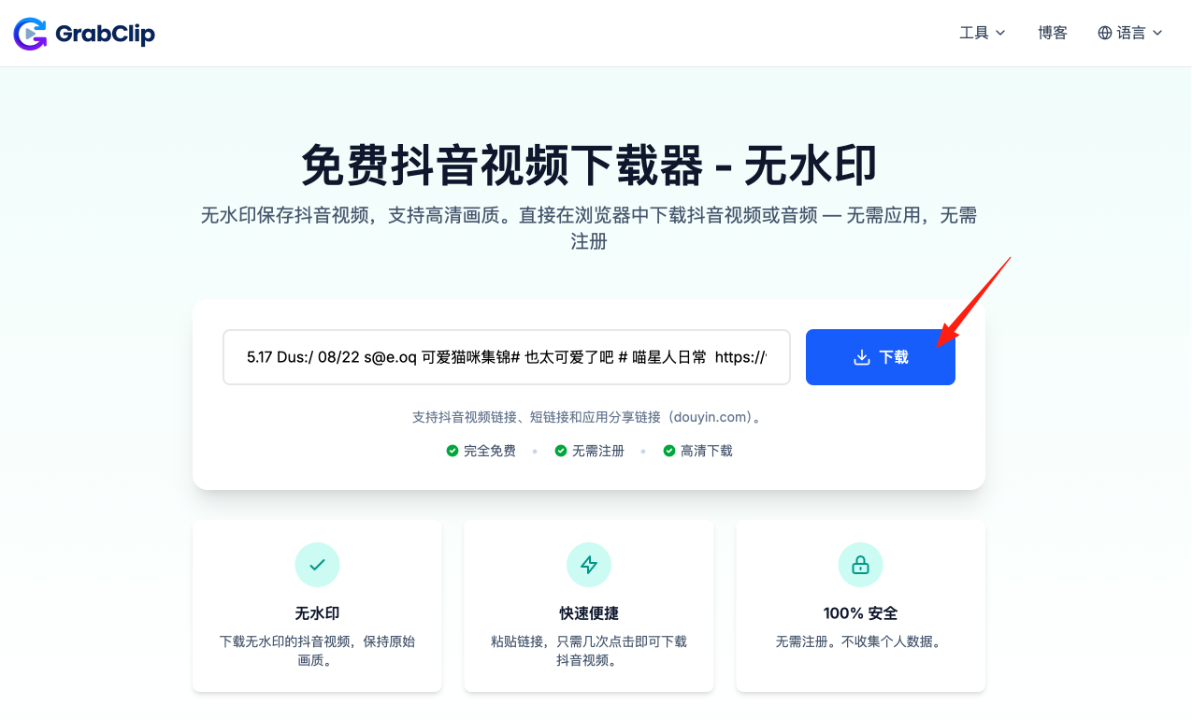
Step 4: Paste the link and click Download
Paste the Douyin link you copied into the input box, then click the Download button to start processing.
According to the current tool page, video processing usually takes only 1–2 seconds.
If your network is stable, the whole process is usually quick.
Step 5: Save the video or audio to your device
After the link is processed, you can choose the download option that fits your needs.
According to the GrabClip Douyin tool page:
- The video is saved directly to your device
- It is provided in a common format that works across devices
- Higher-quality versions may be available, such as HD, Full HD, or 4K
- Audio can also be downloaded when needed
- Videos are available in MP4 format for broad compatibility
If multiple download options are shown, you can choose the one that works best for you.

What Types of Douyin Video Links Are Supported
Based on the current tool page, GrabClip mainly supports these Douyin link formats:
- douyin.com/video/
- v.douyin.com
- iesdouyin.com/share/video/
- Douyin page links with modal_id
If these are the types of Douyin videos you usually save, the process is straightforward.
Private, restricted, or inaccessible content usually cannot be processed.
How to Improve Your Success Rate When Downloading Douyin Videos
If you want the process to work more smoothly, these tips can help:
1. Make sure the copied link is complete
If the copied link is incomplete, processing may fail.
2. Use standard Douyin video links whenever possible
Links in the format douyin.com/video/..., v.douyin.com/..., or standard app share links are usually more stable to process.
3. Keep your network connection stable
Sometimes slow processing is caused by network conditions rather than the tool itself.
4. Use the original video page link whenever possible
Try to copy the original Douyin video page or shared link directly instead of using redirected pages.
5. Choose the quality that fits your needs
If multiple download options are available, compare them and choose the video quality that works best for your device, storage, or editing workflow.
Who This Method Is Useful For
Handling Douyin video links in a browser is useful for:
- Everyday users who want to save videos they like
- Content creators who need to organize video materials
- Social media operators and competitor researchers
- Teams collecting reference materials for editing or inspiration
- People who prefer managing files directly on desktop or mobile
Frequently Asked Questions
Can I download Douyin videos without watermark?
Yes. GrabClip currently supports downloading Douyin videos without watermark.
What link formats are supported?
Common supported formats include douyin.com/video/, v.douyin.com, iesdouyin.com/share/video/, and some Douyin page links with modal_id.
Do I need to install software or an app?
No. The full process can be completed directly in a browser.
Do I need to register an account?
No. GrabClip can be used without creating an account.
Can I use it on mobile and desktop?
Yes. It can be accessed from browsers on iPhone, Android, PC, Mac, and tablet devices.
Can I download higher-quality videos?
When available, GrabClip supports original quality, HD, 1080P, and even 4K download options.
Can I download audio only?
Yes. According to the current tool page, GrabClip also supports downloading Douyin audio.
Conclusion
If you want an easier way to download Douyin videos without watermark, a browser-based workflow is often the most direct option.
Copy the link, process it on the page, and save the file in just a few steps.
You can start here:
https://www.grabclip.com/douyin
For users who want to save Douyin videos, organize video materials, back up content, extract audio, or collect creative references, this method is practical for everyday use.