How to Download Bilibili Videos in HD Online: A Safe SESSDATA Guide
Bilibili is one of the most popular video platforms for anime, gaming, education, tech reviews, music, documentaries, creator videos, and community content.
Sometimes, you may want to save a Bilibili video for offline viewing, personal study, or content reference. However, downloading Bilibili videos in HD can be different from downloading videos from many other platforms.
For some Bilibili videos, especially higher-quality videos, the downloader may need your Bilibili login session information to access the available HD media resource. This is where SESSDATA may be required.
With GrabClip Bilibili Downloader, you can paste a Bilibili video link, provide SESSDATA when needed, and download the available video online.
Tool page:
GrabClip Bilibili DownloaderWhy Bilibili HD Video Download May Require SESSDATA
Some Bilibili videos are publicly visible, but the higher-quality video resources may only be available to logged-in users.
For example, you may be able to watch a video in your browser after logging in to Bilibili, but an online downloader may not be able to access the same HD resource unless it can confirm your login status.
That is why some Bilibili download workflows use SESSDATA.
SESSDATA helps the downloader access the video resource in a way that is closer to your logged-in browser session. This can be useful when you want to download Bilibili videos in HD or when the video requires login-based access.
In short:
- Some Bilibili videos can be downloaded without SESSDATA.
- Some HD videos may require SESSDATA.
- Some videos may still be unavailable because of privacy, region restrictions, account permissions, or platform changes.
What Is SESSDATA on Bilibili?
SESSDATA is a browser cookie used by Bilibili to identify your logged-in session.
When you log in to Bilibili in your browser, Bilibili stores cookies in your browser. These cookies help the website remember that you are logged in.
SESSDATA is one of those cookies.
For Bilibili video downloading, SESSDATA may help the downloader access video resources that are only available when you are logged in.
However, SESSDATA is sensitive information. You should treat it carefully because it is related to your Bilibili login session.
Is It Safe to Use SESSDATA?
SESSDATA should be handled carefully.
Because SESSDATA is connected to your logged-in Bilibili session, you should never share it publicly, post it online, send it to strangers, or save it in unsafe places.
Only use SESSDATA on tools and websites you trust.
Before using SESSDATA, keep these safety rules in mind:
- Do not share your SESSDATA with other people.
- Do not publish screenshots that show your SESSDATA value.
- Do not paste SESSDATA into random websites.
- Do not store SESSDATA in public notes or shared documents.
- Log out of Bilibili or change your password if you believe your session information may have been exposed.
GrabClip uses SESSDATA only to help process Bilibili video links when required. You are responsible for keeping your account and session information safe.
How to Find Your Bilibili SESSDATA in Chrome
Below is a step-by-step guide for finding your Bilibili SESSDATA cookie in Chrome.
The process may look slightly different depending on your Chrome version and system language, but the general path is the same.
Step 1: Open Bilibili in Chrome
First, open Chrome and go to:
Log in to your Bilibili account.
Then open the Bilibili video you want to download and make sure the video can play normally in your browser.
If the video cannot play normally in your browser, the downloader may not be able to process it either.
Step 2: Open Developer Tools
In Chrome, open the menu in the top-right corner.
Then go to:
More tools → Developer tools
You can also use a shortcut:
- Windows: Ctrl + Shift + I
- Mac: Command + Option + I
This will open Chrome Developer Tools.
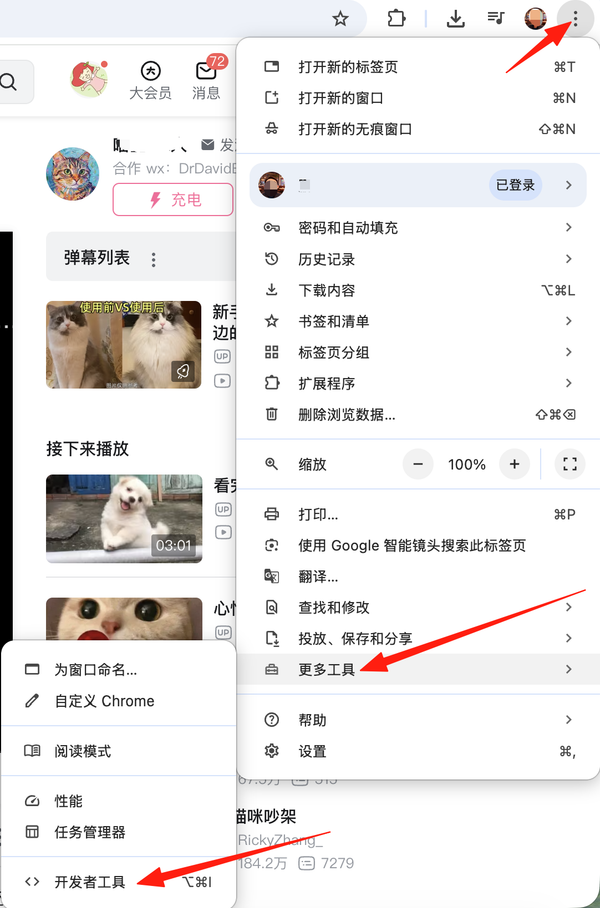
Step 3: Go to the Application Tab
In Developer Tools, find and click the Application tab.
If you do not see the Application tab immediately, click the small arrow or more-tabs menu in Developer Tools to find it.
The Application panel lets you inspect browser storage, including cookies.
Step 4: Open Cookies for Bilibili
In the left sidebar of the Application panel, find the Storage section.
Then open:
Cookies → https://www.bilibili.com
After selecting the Bilibili cookie storage, Chrome will show a list of cookie names and values on the right side.
Step 5: Find and Copy SESSDATA
In the cookie list, look for the cookie named:
SESSDATA
Click the row for SESSDATA and copy its Value.
Make sure you copy only the value of SESSDATA, not the cookie name.
Do not copy or share other cookies unless the tool specifically asks for them.
After copying the SESSDATA value, you can paste it into the SESSDATA field on GrabClip when downloading a Bilibili video.
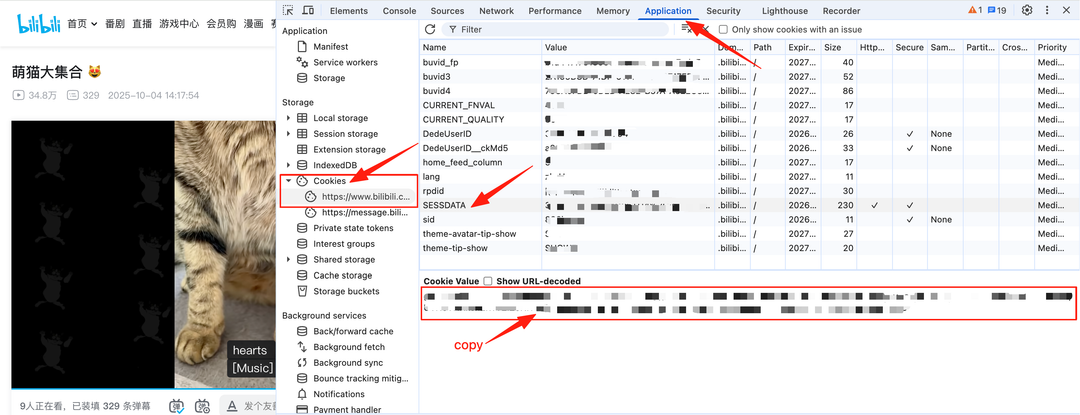
How to Download Bilibili Videos in HD with GrabClip
After you have the Bilibili video link and SESSDATA value, you can use GrabClip to process the video.
Follow these steps:
Step 1: Open the Bilibili Video
Open the Bilibili video you want to download.
Make sure the video can play normally in your browser. If you want to download an HD version, make sure you are logged in to Bilibili and can access the video quality you need.
Step 2: Copy the Bilibili Video Link
Copy the Bilibili video link.
You can copy the URL from the browser address bar, or click the share button on the Bilibili video page and choose the copy link option.
On some Bilibili pages, you may see a share panel with a copy button or a click to copy option. Use that option to copy the direct video link.
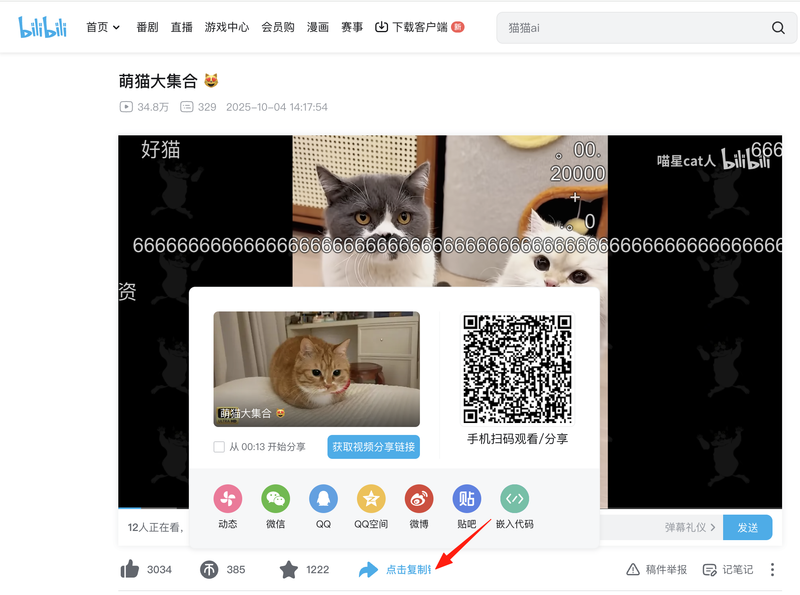
Step 3: Open GrabClip Bilibili Downloader
Open the GrabClip Bilibili tool page:
https://www.grabclip.com/bilibili
GrabClip works in the browser, so you do not need to install a separate downloader app.
Step 4: Paste the Bilibili Link and SESSDATA
Paste the Bilibili video link into the video link input box.
If the page asks for SESSDATA, paste your copied SESSDATA value into the SESSDATA field.
Then click the Download button.
On some localized pages, the button may appear as 下载.
GrabClip will process the Bilibili link and prepare the available download options.
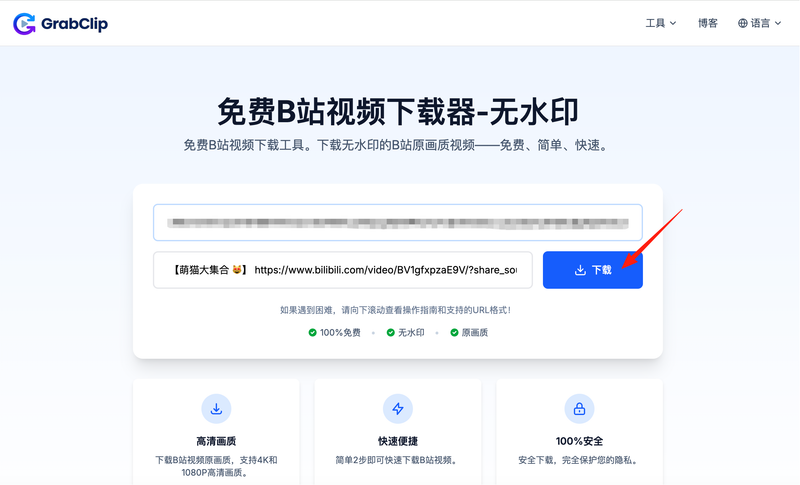
Step 5: Download the Video
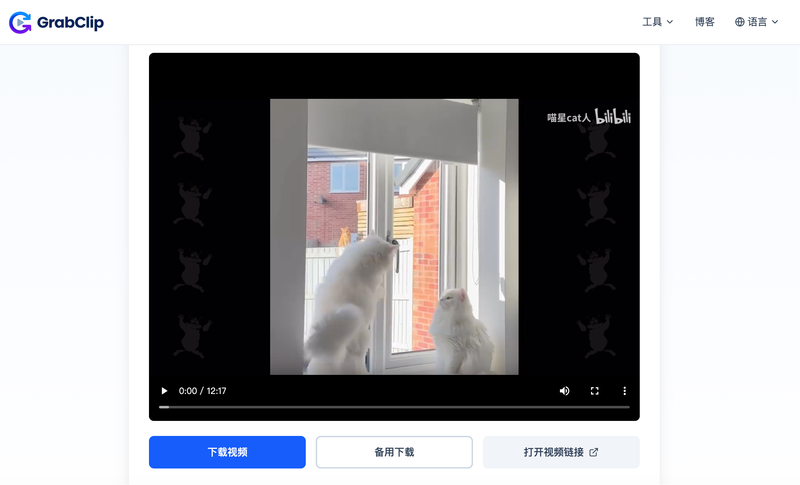
After the link is processed, GrabClip will show the result page with a video preview and download options.
Click Download Video to save the available video file to your device.
If the main download button does not work in your browser, you can try the backup download option shown on the page.
The final video quality may depend on the original Bilibili video, your account access, the available media resource, and whether the video can be accessed with your current session.
Important Safety Tips Before Using SESSDATA
SESSDATA is useful, but it should be treated like private account session information.
Before using it, please remember:
- Only copy SESSDATA from your own Bilibili account.
- Only use SESSDATA for videos you have the right to access.
- Do not use someone else’s account cookie.
- Do not share your SESSDATA in comments, forums, messages, or public screenshots.
- Do not save SESSDATA in a public document.
- If you are using a shared computer, clear your browser data or log out after finishing.
- If you think your SESSDATA has been exposed, log out of Bilibili and refresh your account session.
For better privacy, you can also use a separate browser profile for this workflow.
Why Bilibili Video Download May Fail Sometimes
Sometimes a Bilibili video may fail to download even if you have copied the link and SESSDATA correctly.
Common reasons include:
- The Bilibili video link is invalid.
- The video has been deleted.
- The video is private or restricted.
- The video requires special permissions.
- The copied SESSDATA is incomplete or expired.
- You are not logged in to Bilibili in Chrome.
- The video cannot be played in your own browser.
- Bilibili has changed how the video resource is delivered.
- The network connection is unstable.
- The browser blocks the download.
- The video does not provide the expected HD resource.
If this happens, try the following:
- Open the original Bilibili video and confirm it can play normally.
- Make sure you are logged in to Bilibili.
- Copy the Bilibili video URL again.
- Copy the SESSDATA value again from Chrome.
- Refresh GrabClip and try again.
- Try another browser if the download button does not work.
- Check whether the video is restricted, deleted, or unavailable.
If the original video cannot be opened or played normally, the downloader may not be able to access it.
Tips for Downloading Bilibili Videos in Better Quality
To improve your success rate, follow these tips:
- Use the direct Bilibili video URL.
- Make sure the video can play normally in your browser.
- Log in to Bilibili before copying SESSDATA.
- Copy the full SESSDATA value carefully.
- Use a modern browser such as Chrome or Edge.
- Use a stable network connection.
- Try again if the first request fails.
- Save the downloaded file with a clear name.
- Keep your SESSDATA private and secure.
If you want to download Bilibili videos in HD, the most important step is making sure your browser session can access the HD version of the video.
Can You Download Bilibili Videos Without SESSDATA?
Some Bilibili videos may be downloadable without SESSDATA.
However, if the video requires login access, or if the HD resource is only available to logged-in users, SESSDATA may be required.
A simple way to understand it:
- If the video is publicly accessible and does not require login, SESSDATA may not be needed.
- If the video requires login or higher-quality access, SESSDATA may help.
- If the video is private, deleted, restricted, or unavailable to your account, SESSDATA may not solve the problem.
So SESSDATA is helpful, but it is not a guarantee that every Bilibili video can be downloaded.
Can You Download Bilibili Videos Without Watermark?
Many users want to download Bilibili videos without watermark or save the original-quality video for personal viewing.
GrabClip is designed to help users download the available Bilibili video resource from the copied link. Whether the downloaded video is watermark-free may depend on the original video source and the available media resource.
Some Bilibili videos may include watermarks, logos, subtitles, overlays, or creator-added elements in the original file. If those elements are already part of the source video, they may still appear after downloading.
For the best result:
- Copy the direct Bilibili video link.
- Make sure the video can play normally in your browser.
- Use SESSDATA when HD access is required.
- Choose the available download option provided by GrabClip.
- Check the downloaded video after saving it.
GrabClip can help you download available Bilibili video resources online, but watermark-free results may vary depending on the source video.
Is It Legal to Download Bilibili Videos?
Bilibili videos may belong to their creators, copyright owners, publishers, or other rights holders.
You should only download Bilibili videos when you have the right to do so, such as:
- Your own videos
- Videos you have permission to save
- Content allowed for personal offline viewing
- Public content saved for private, non-commercial reference where permitted
Do not repost, sell, redistribute, or commercially use downloaded videos without permission.
GrabClip is a browser-based tool for processing video links. You are responsible for using downloaded content legally and respecting the rights of creators and copyright owners.
FAQ
What is SESSDATA on Bilibili?
SESSDATA is a Bilibili browser cookie related to your logged-in session. It may help a downloader access video resources that require login-based access.
Do I need SESSDATA to download Bilibili videos?
Not always. Some Bilibili videos may be processed without SESSDATA. However, HD videos or login-required videos may need SESSDATA.
How do I find Bilibili SESSDATA in Chrome?
Open Bilibili in Chrome, log in, open Developer Tools, go to Application → Storage → Cookies → https://www.bilibili.com, then find the cookie named SESSDATA and copy its value.
Is it safe to copy SESSDATA?
SESSDATA is sensitive session information. You should only use it on tools you trust and never share it publicly.
Can I download Bilibili videos in HD?
In many cases, yes. If the original video provides HD resources and your session can access them, GrabClip can help you process the available HD download option.
Why does Bilibili HD download require login?
Some Bilibili video resources may only be available to logged-in users. SESSDATA helps represent your logged-in browser session when processing the video link.
Why is my SESSDATA not working?
Your SESSDATA may be expired, incomplete, copied incorrectly, or not allowed to access the video. Try logging in again, refreshing Bilibili, and copying the SESSDATA value again.
Can I use someone else’s SESSDATA?
No. You should not use someone else’s session information. Only use your own account session and keep it private.
Can I download Bilibili videos without watermark?
GrabClip helps download available Bilibili video resources. Whether the downloaded video is watermark-free may depend on the original source and available media file.
Can I download private Bilibili videos?
If a video is private, deleted, restricted, or unavailable to your account, the downloader may not be able to process it.
Can I repost downloaded Bilibili videos?
Only if you have permission or the legal right to do so. Do not repost or reuse copyrighted videos without authorization.
Downloading Bilibili videos in HD can be more complex than downloading videos from some other platforms, especially when the video requires login-based access.
With GrabClip Bilibili Downloader, you can copy a Bilibili video link, provide SESSDATA when needed, and download the available video online.
Start here: