How to Download TikTok HD Videos Without Watermark on PC
Many people run into the same problems when saving TikTok videos on a computer: some tools still leave a watermark, some downloads look blurry, and others require software installation or account sign-up, which makes the process less convenient.
If you want an easier way to download TikTok HD videos without watermark on PC, or extract audio separately, a simpler option is to use a browser-based online tool. GrabClip’s TikTok downloader page lets you process TikTok video links directly in your browser, without installing software or logging in.
Tool page: https://www.grabclip.com/tiktok
Common Problems When Downloading TikTok Videos on PC
When people search for terms like TikTok video download, TikTok downloader without watermark, or TikTok HD download, they usually care less about the tool name and more about practical questions like these:
- Will the downloaded video still have a watermark?
- Is the video quality clear enough, and can I save an HD version?
- Does it work directly on Windows and Mac?
- Do I need to install an app or extension?
- Can I download audio only?
- After pasting the link, can I finish the process quickly?
A useful guide should answer those questions clearly, not just tell users where to go.
What GrabClip Is Useful For
If your goal is to process TikTok video links on desktop, a browser-based tool like GrabClip is especially useful for situations like these:
- You want to download TikTok HD videos
- You want to save a version without watermark
- You want to handle TikTok links directly in a desktop browser
- You do not want to install extra software
- You want to extract audio from TikTok videos
- You want to save materials quickly for editing, organizing, or backup
For people who regularly collect short-form video materials, a browser workflow is often more direct than installing local software: copy the link, open the page, paste it, and save the file.
Key Features of GrabClip
These are also some of the points many users care about most when choosing a TikTok downloader.
1. Works directly in your browser
There is no need to install desktop software. You can open the page on your computer and start from there, which is convenient for both Windows and Mac users.
2. Supports TikTok video link processing
Once you copy a TikTok video link, you can paste it into the tool page and continue.
That usually saves steps compared with more complicated workflows.
3. Lets you choose video or audio
Besides saving the video itself, some users may also want to extract audio for content organization or archiving.
4. More convenient for desktop saving and organization
Many users do not just want to watch a video once. They want to save it for collection, review, editing reference, or team collaboration.
Handling that on desktop is often more convenient.
How to Download TikTok HD Videos Without Watermark on PC
Below is the typical workflow.
Step 1: Open TikTok and find the video you want
You can find the video in the TikTok app, or open TikTok directly in your desktop browser.
TikTok website: https://www.tiktok.com/
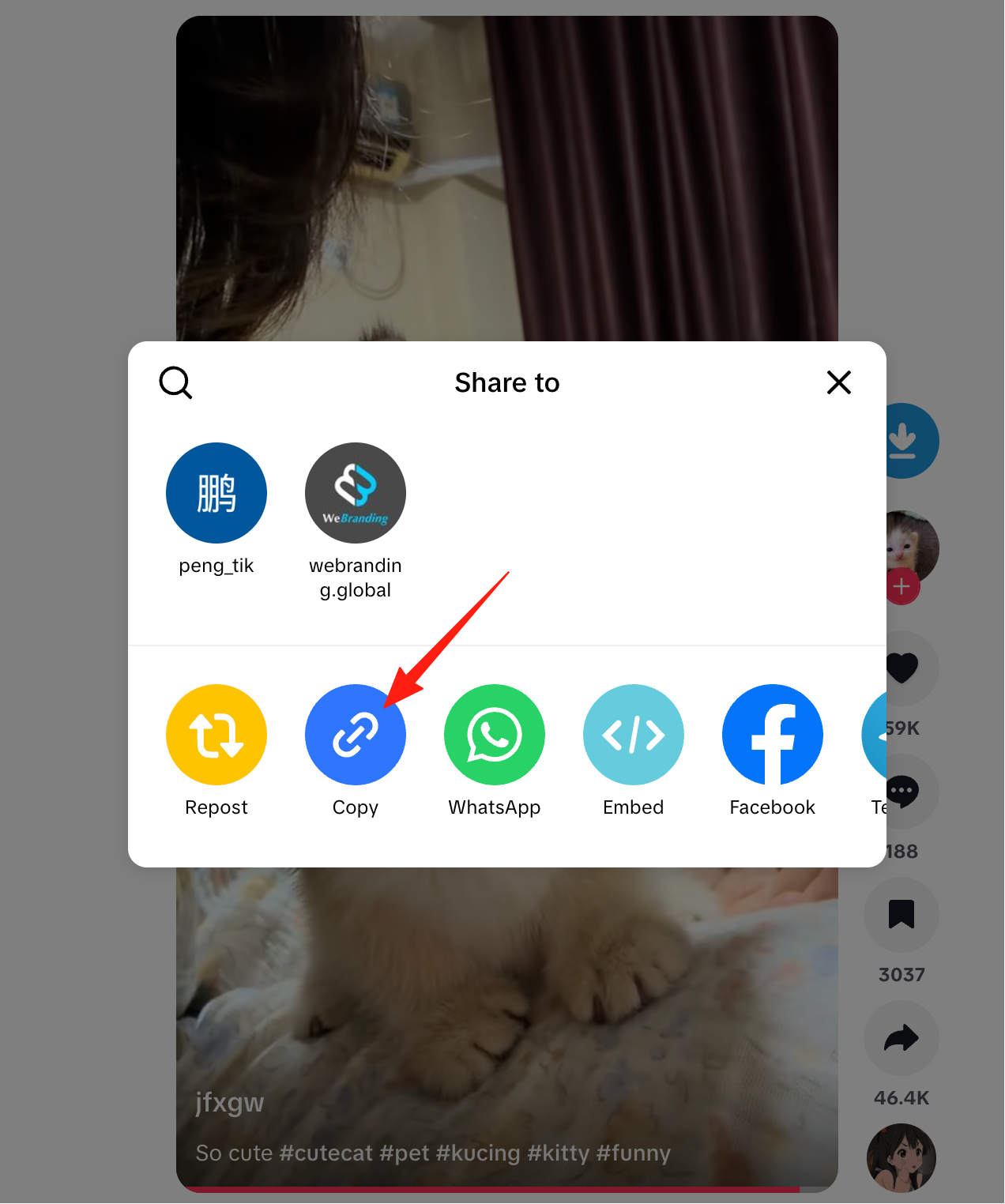
Step 2: Copy the TikTok video link
Copy the link in the TikTok app or on the website
- Open the video you want to save
- Click or tap Share
- Choose Copy Link
Copy the link on desktop web
- Open the target video page
- Click the share button
- Choose Copy Link

Step 3: Open the GrabClip TikTok page
In your desktop browser, visit:
https://www.grabclip.com/tiktok
This page is the entry point for processing TikTok video links.
You may want to bookmark it so it is easier to use again later.
Step 4: Paste the link and start processing
Paste the TikTok video link you copied into the input box, then click the button to continue.
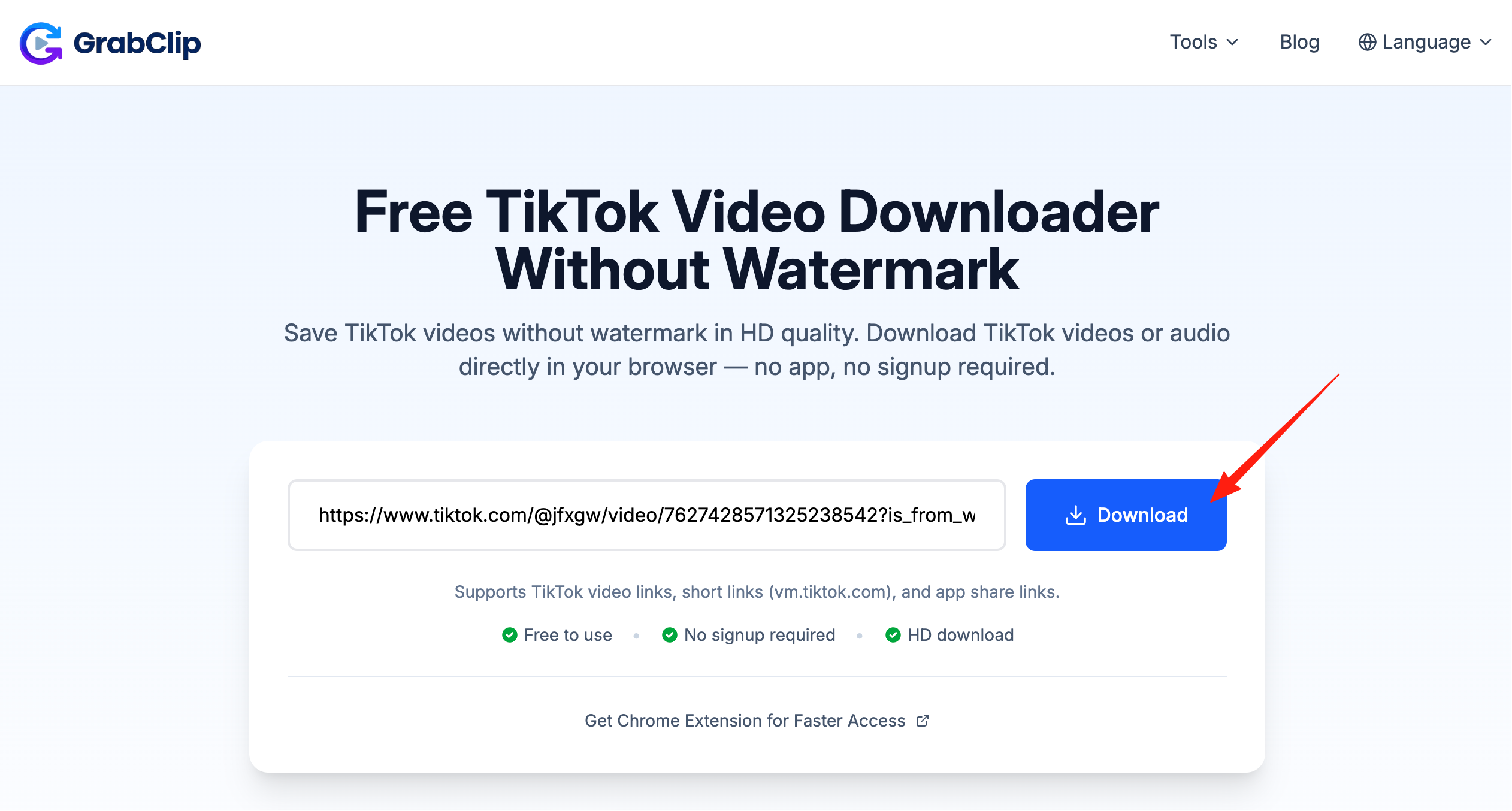
This step usually takes only a few seconds, depending on your network and the video status.
Step 5: Choose the download option you need
After the link is processed, you can usually choose from options such as:
- Download MP4 video
- Download a higher-quality version
- Extract audio
- Use an alternative option if needed

If the button appears a little slowly, waiting a few seconds is usually enough.
How to Get a Clearer TikTok Video Download on Desktop
Many users searching for TikTok HD download, TikTok 1080P download, or save TikTok videos in high quality are really looking for one thing: clarity.
A few practical tips can help:
1. Start with a higher-quality source video
If the original TikTok upload is already clear, the saved result is more likely to look good as well. If the source video is blurry, switching tools usually will not improve it much.
2. Use desktop when possible
On desktop, it is easier to compare download options and manage saved files afterward.
3. Check your network status
Sometimes slow loading or unstable downloads are caused by your network rather than the tool itself.
4. Make sure the link is valid
If the video has been removed, restricted, or copied incorrectly, it may not process normally.
Why Many Users Prefer Browser-Based Downloading Instead of Installing Software
For general users and content teams, browser tools have several practical advantages:
- No extra software to install or maintain
- No need to set everything up again when switching computers
- Easy to use from a web page
- Better for temporary link handling
- Convenient for quickly saving and organizing short-form video materials
Especially when you simply want to save a TikTok video to your computer, a browser workflow is often the more direct option.
Who This Method Is Useful For
Handling TikTok links through a web page on desktop is especially useful for:
- Everyday users who want to save favorite videos
- Content creators who organize short-form video materials
- Operators and marketers collecting editing references or inspiration
- Users who want to extract audio only
- Anyone who prefers managing files on desktop
Frequently Asked Questions
Can I download TikTok videos directly on PC?
Yes. A common method is to copy the TikTok video link first, then process it through a browser-based tool.
Do I need to install software to download TikTok videos?
Not always. Many users prefer completing the whole process in a browser because it requires fewer steps.
Can I download audio only?
Some tools support both video and audio options, depending on the results shown on the page.
Does it work on Windows and Mac?
As long as you can open the page in a browser, it can generally be used on both desktop systems.
Conclusion
If you are looking for a simpler way to download TikTok HD videos without watermark on PC, a browser-based workflow is often the most direct option.
Copy the video link, process it in your browser, and save the file in just a few steps.
You can start here:
https://www.grabclip.com/tiktok
For users who want to save TikTok videos, extract audio, organize materials, or keep videos for later reference, this approach is practical for long-term use.