How to Download Douyin Audio and Save It as MP3 Online
Douyin videos often include useful sounds, music clips, voiceovers, story narration, and spoken content. Sometimes, you may not need the full video — you only want to save the audio.
With GrabClip Douyin Downloader, you can copy a Douyin video link, paste it into your browser, and download the available audio from the video.
In many cases, the downloaded audio can be saved as MP3. However, the exact format may depend on the original Douyin video and the available media resources. If the downloaded file is not MP3, you can convert it to MP3 afterward.
Tool page:
GrabClip Douyin DownloaderWhy Download Audio from a Douyin Video?
Douyin videos may contain many types of audio that are useful to save separately, such as:
- Background music
- Original sounds
- Voiceovers
- Story narration
- Educational explanations
- Podcast-style short clips
- Music covers
- Dialogue clips
- Spoken tutorials
If you only need the sound, downloading audio is often more convenient than saving the full video.
Audio files are easier to store, rename, organize, and play offline. They are also useful when you want to keep a sound for personal listening, reference, note-taking, or editing workflows.
Can You Download Douyin Audio as MP3?
Yes, in many cases you can download audio from Douyin videos and save it as MP3 using GrabClip.
However, not every Douyin video will always provide the same audio format. Some videos may allow MP3 audio download, while others may provide audio in another media format.
The practical workflow is:
- Copy the Douyin video link.
- Paste the link into GrabClip Douyin Downloader.
- Click the Download button.
- On the result page, choose Download Audio.
- Save the audio file to your device.
- If the file is not MP3, convert it to MP3 if needed.
This makes GrabClip useful for users searching for a Douyin audio downloader, Douyin to MP3 tool, or a way to extract sound from Douyin videos online.
How to Download Douyin Audio and Save It as MP3 Online
Follow the steps below to download audio from a Douyin video.
Step 1: Open the Douyin Video and Click Share
First, open the Douyin video that contains the audio you want to save.
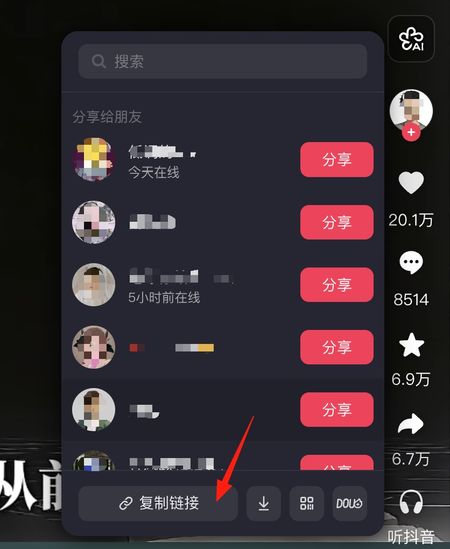
On the right side of the video page, click the Share button. This is usually the arrow-shaped icon near the like, comment, and favorite buttons.
After clicking it, Douyin will open the sharing panel.

Step 2: Copy the Douyin Video Link
In the sharing panel, click 复制链接.
This means Copy link.
After clicking it, the Douyin video link will be copied to your clipboard.
Make sure you copy the direct video link, not only the creator profile page or a general Douyin page. A direct video link helps GrabClip identify the correct video and audio resources.
Step 3: Paste the Link into GrabClip Douyin Downloader
Next, open the GrabClip Douyin tool page:
https://www.grabclip.com/douyin
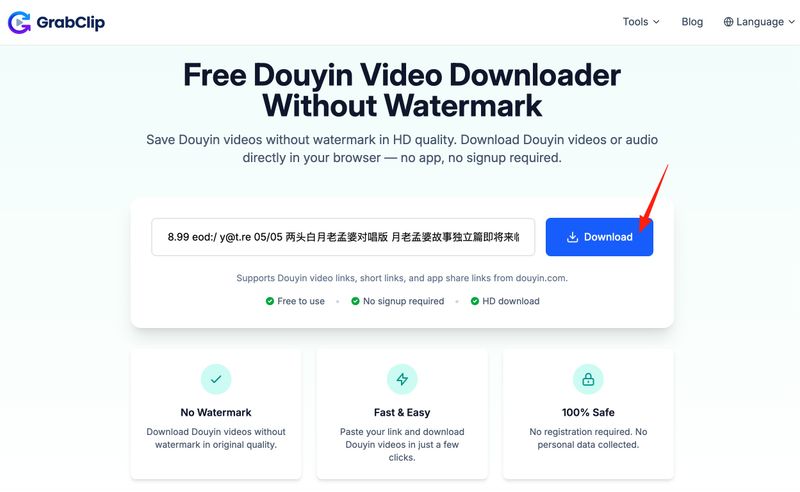
Paste the copied Douyin video link into the input box.
Then click the Download button.
GrabClip will process the Douyin link and prepare the available video and audio download options.
Step 4: Click Download Audio
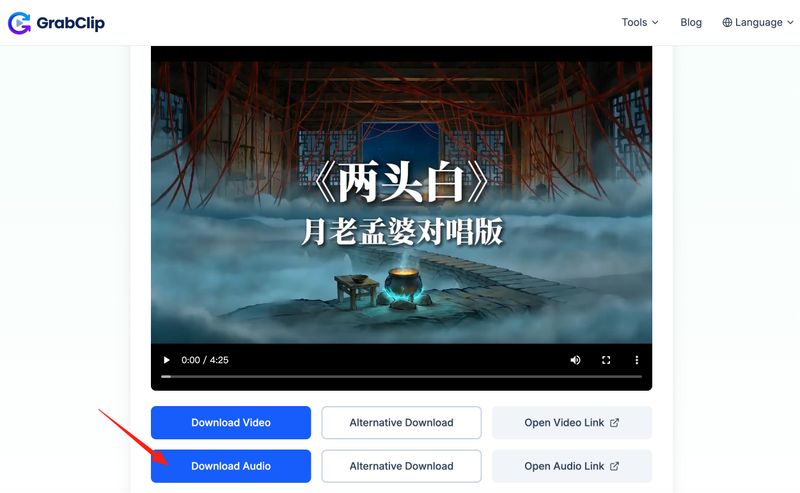
After the Douyin link is processed, GrabClip will show a result page with download options.
If you only want the sound from the Douyin video, click Download Audio.
This option downloads the available audio file from the Douyin video. In many cases, the file may be saved as MP3. If a different format is downloaded, you can still convert it to MP3 later.
If the main download button does not work in your browser, you can try the alternative download option shown on the result page.
Step 5: Save the Audio File to Your Device
After clicking Download Audio, your browser will start downloading the audio file.
On desktop, the file is usually saved to your Downloads folder.
On mobile, the file may be saved to your browser downloads, Files app, or system download folder depending on your device and browser settings.
After downloading, you can rename the file, move it into a folder, or import it into an audio player or editing app.
What If the Downloaded Douyin Audio Is Not MP3?
Although many users search for “Douyin to MP3,” the downloaded audio format may vary depending on the source video.
If the downloaded file is already MP3, you can use it directly.
If the downloaded file is in another format, you can convert it to MP3 using an audio converter or editing tool.
A simple workflow is:
- Download the Douyin audio with GrabClip.
- Check the downloaded file format.
- If the file is not MP3, open it with an audio converter.
- Choose MP3 as the output format.
- Save the converted MP3 file.
MP3 is often preferred because it works with most phones, computers, media players, and audio editing tools.
How to Download Douyin Audio on PC or Mac
If you are using a computer, the process is simple:
- Open the Douyin video in your browser.
- Click the Share button.
- Click 复制链接 to copy the video link.
- Open GrabClip Douyin Downloader.
- Paste the link into the input box.
- Click Download.
- Click Download Audio on the result page.
- Save the audio file to your computer.
- Convert it to MP3 if needed.
This is useful if you want to organize Douyin audio files, save music clips, or import audio into editing software.
How to Download Douyin Audio on Mobile
You can also download Douyin audio using a mobile browser.
The basic process is:
- Open the Douyin app.
- Find the video you want to save audio from.
- Tap the Share button.
- Tap 复制链接 to copy the link.
- Open your mobile browser.
- Visit GrabClip Douyin Downloader.
- Paste the Douyin link.
- Tap Download.
- Tap Download Audio.
- Save the audio file to your device.
If you cannot find the downloaded file, check your browser’s download list or the system file manager.
Audio vs Video: Which One Should You Download?
If you only need the sound, downloading audio is usually better than downloading the full video.
An audio file is:
- Smaller than a video file
- Easier to play offline
- Easier to organize
- More convenient for listening
- Useful for audio editing workflows
A video file is better when you need both the visuals and the sound.
For example, if you want to keep a complete Douyin story video, download the video. If you only need the music, narration, or voiceover, choose Download Audio.
Why Douyin Audio Download May Not Work Sometimes
Sometimes a Douyin audio download may fail or show fewer options than expected.
Common reasons include:
- The Douyin link is invalid
- The video has been deleted
- The video is private or restricted
- The copied link is incomplete
- The network connection is unstable
- The browser blocks the download
- Douyin has changed how the media is delivered
- The video does not provide a separate audio resource
If this happens, try copying the link again, refreshing the GrabClip page, or using another browser.
You can also check whether the original Douyin video can still be opened normally. If the original video is no longer available, the audio may not be available either.
Tips for Downloading Douyin Audio More Easily
Here are a few simple tips:
- Always copy the direct Douyin video link.
- Use a modern browser such as Chrome, Edge, or Safari.
- Click Download Audio if you only need the sound.
- Rename the file after downloading.
- Create folders for different types of audio.
- Check your download folder if the file does not open automatically.
- Convert the file to MP3 if your workflow specifically requires MP3.
These small habits can make it easier to manage Douyin audio files, especially if you download sounds regularly.
Is It Legal to Download Douyin Audio?
Douyin videos, background music, original sounds, voiceovers, and other media may be protected by copyright or belong to the original creators.
You should only download Douyin audio when you have the right to do so, such as:
- Your own Douyin videos
- Audio you have permission to use
- Content allowed for personal reference
- Public content saved for private, non-commercial use where permitted
Do not reuse, repost, sell, redistribute, or commercially use copyrighted music, creator audio, or protected content without permission.
GrabClip is a browser-based tool for processing links. You are responsible for using downloaded content legally and respecting the rights of creators and copyright owners.
FAQ
Can I download Douyin audio without installing an app?
Yes. You can use GrabClip Douyin Downloader in your browser. Copy the Douyin video link, paste it into GrabClip, click Download, and choose Download Audio.
Can I save Douyin audio as MP3?
In many cases, yes. GrabClip may provide MP3 audio downloads for Douyin videos. However, the format may vary depending on the source video. If the downloaded file is not MP3, you can convert it afterward.
Can I download only the audio from a Douyin video?
Yes. After GrabClip processes the Douyin link, choose Download Audio to save the audio file instead of downloading the full video.
Why is my downloaded Douyin audio not MP3?
Not all Douyin videos provide the same audio format. The final file format may depend on the original media resource and browser behavior. If you need MP3, you can convert the downloaded file to MP3 later.
Can I download Douyin audio on mobile?
Yes. Copy the Douyin video link in the Douyin app, open GrabClip in your mobile browser, paste the link, and tap Download Audio.
Do I need a Douyin account to download audio?
In most cases, you only need a valid Douyin video link. Private, deleted, or restricted videos may not be available.
Why can’t I download audio from some Douyin videos?
The video may be deleted, private, restricted, or unavailable. The copied link may also be incomplete, or the video may not provide a separate audio resource.
Can I use downloaded Douyin audio in my own videos?
Only if you have permission or the legal right to use that audio. Do not reuse copyrighted music, creator voiceovers, or protected content without authorization.
Final Thoughts
Downloading audio from a Douyin video is useful when you only need the sound, not the full video.
With GrabClip Douyin Downloader, you can copy a Douyin video link, paste it into your browser, click Download, and choose Download Audio to save the available audio file.
In many cases, you may be able to save Douyin audio as MP3. If the downloaded file is in another format, you can convert it to MP3 afterward.
Start here: