How to Download TikTok Videos Without Watermark on Mobile (iPhone / Android Guide)
Many people run into the same issues when trying to save TikTok videos on their phone:
Some methods still keep the watermark, some are too complicated, and others require installing apps or creating accounts, which isn’t ideal if you just want to save a few clips quickly.
If you want an easier way to download TikTok videos without watermark, in HD, or extract audio directly on your phone, a simple option is to use an online tool in your mobile browser.
The GrabClip TikTok downloader page lets you process TikTok video links right in the browser. You don’t need to install any software or log in.
Tool page: https://www.grabclip.com/tiktok
Common problems when downloading TikTok videos on your phone
When people search for things like “TikTok download on phone”, “TikTok no watermark download”, “download TikTok on iPhone”, or “save TikTok on Android”, what they really care about is usually:
- Will the downloaded video still have a watermark?
- Can I use it directly on my iPhone / Android phone?
- Is the video quality clear? Can I save an HD version?
- Do I have to install an extra app or tool?
- Can I download only the audio if I need it?
- After copying the link, can I finish everything in just a few taps?
So a truly useful tutorial shouldn’t just say “go here to download”. It should walk you through the whole process step by step.
What GrabClip is good for
If your goal is to handle TikTok video links on your phone, a web-based tool like GrabClip works well in these situations:
- You want to download TikTok videos without watermark
- You want to save a clearer / higher-quality version
- You prefer doing everything in your mobile browser
- You don’t want to install extra apps
- You want to extract audio from a video
- You want to quickly save clips as material for later organizing or backup
For many mobile users, using a website is more straightforward than installing an app: Copy the link, open the website, paste, process, and download.
Key features of using GrabClip
These are the points most people care about when looking for a TikTok downloader that works on mobile.
1. Works directly in your mobile browser
No extra software needed. Both iPhone and Android users can just open the page in Safari, Chrome, or any other browser.
For one‑off or occasional downloads, this is usually the fastest option.
2. Supports TikTok video links
Copy the TikTok video link, paste it into the tool, and continue from there.
Compared with downloading first and then processing, this link-based flow is simpler and more direct.
3. Choose video or audio
Besides downloading the video, in some cases you can also extract just the audio. This is handy if you’re organizing sound clips or collecting background music.
4. Designed for quick use on phones
Most people decide to save a TikTok video while they’re already scrolling in the app.
In that moment, handling the link in your mobile browser is usually easier than switching to a complex tool.
How to download TikTok videos without watermark on your phone
Let’s go through the actual steps.
Step 1: Open TikTok and find the video
First, open the TikTok app and go to the video you want to save.
Step 2: Copy the TikTok video link
On the video page, tap Share, then choose Copy link.
On mobile, copying the link is almost always the first step. Everything else will be based on this link.
Step 3: Open the GrabClip TikTok page
In your mobile browser, go to:
https://www.grabclip.com/tiktok
This page is the main entry point for processing TikTok video links.
If you often save TikTok videos, you can bookmark it in your browser so it’s easier to access next time.
Step 4: Paste the link and start processing
Paste the TikTok video link you just copied into the input box, then tap the button to start processing.
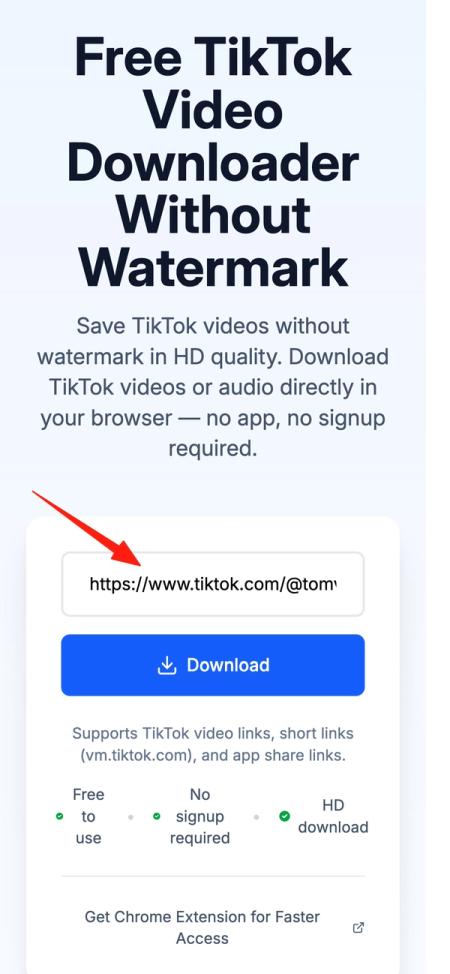
This usually takes only a short time. The exact speed depends on your network and the status of the video.
Step 5: Choose how you want to download
Once the link has been processed, you’ll typically see several options. Depending on what’s available on the page, you might be able to:
- Download the MP4 video
- Download a higher-quality / clearer version
- Extract audio
- Use an alternative option to complete the download

If the buttons take a moment to appear, just wait a few seconds.
What iPhone users care about when downloading TikTok videos
Many people specifically search for “download TikTok on iPhone” or “iPhone TikTok no watermark” because they’re worried it might be harder to do on iOS.
In reality, as long as the tool works in a mobile browser, you can complete the whole process on an iPhone as well.
For iPhone users, these points matter most:
1. Do everything in the browser if possible
Instead of installing another app, many iPhone users prefer to copy the link and handle everything on a web page. It’s fewer steps and easier to manage.
2. Pay attention to where the file is saved
After the download finishes, the file usually appears in the browser’s download list or in a location that iOS can access (for example, the Files app).
You can then move or organize it however you like.
3. Pick the clearer version when available
If the page offers multiple download options, choose the higher-quality version when you care about viewing experience.
How the process differs on Android
Android phones are often more flexible when it comes to file management and download locations.
But overall, the steps on Android are very similar to iPhone:
- Open the TikTok video
- Copy the link
- Open GrabClip in your browser
- Paste the link and process it
- Download and save to local storage
If you’re already used to doing things in your mobile browser, saving TikTok videos on Android will feel quite natural.
Why so many people search for “remove TikTok watermark”
This is a very common search phrase.
In practice, when people say “remove watermark”, they usually mean:
- They want the video to be saved without a watermark from the start
- They don’t want to crop the video afterward
- They don’t want the watermark to affect the picture or composition
- They want a version that’s easier to reuse or archive
So instead of “download first, then remove the watermark”, downloading a no‑watermark version directly is usually much simpler.
How to get the best possible quality when downloading on mobile
People who search for “TikTok HD download”, “TikTok 1080p download”, or “TikTok high quality” mainly care about clarity.
To get better results, keep these points in mind:
1. Start with a clear original video
If the original TikTok video is high quality, your download will usually look good too.
If the source is already blurry, changing tools won’t magically make it sharp.
2. Make sure the link is valid
If the video has been deleted, set to private, or the link was copied incorrectly, it may not process properly.
3. Check your network connection
Sometimes slow loading or unstable downloads are caused by your current network, not the tool itself.
4. Choose the most suitable option after processing
If the page shows multiple results, pick the one that best fits your needs—for example, the clearer video file or an audio‑only file.
Who this method is best for
Using a web page on your phone to handle TikTok links is a good fit for:
- Regular users who want to save favorite videos
- People who often browse short videos on their phone
- Content creators who need to quickly save reference material
- Users who want to extract audio for organizing or editing
- Anyone who prefers not to install extra tools
FAQ
Can I download TikTok videos directly on my phone?
Yes. The usual approach is to copy the TikTok video link, then use a web tool to process and download it.
Can I download TikTok videos without watermark on iPhone?
Yes. As long as the tool supports mobile browsers, iPhone users can also process videos by copying the link and using the web page.
Is it easier to save TikTok videos on Android?
Many Android phones offer more flexible file management, but the overall steps are almost the same as on iPhone.
Do I have to install software to download TikTok videos?
No. Many users prefer to handle everything in the browser so there are fewer steps and no extra apps.
Can I download only the audio?
Some tools support both video and audio downloads. The exact options depend on what’s shown on the results page.
Summary
If you’re looking for a simple way to download TikTok videos without watermark on your phone, using a web page is often the most straightforward choice.
Copy the video link, then use your mobile browser to process and download it. The steps are easy to follow and don’t require installing anything.
You can start directly from the GrabClip TikTok page:
https://www.grabclip.com/tiktok
For anyone who needs to save TikTok videos, extract audio, collect material, or just keep favorite clips, this method works well for long‑term use.